Start here: your first 5 minutes with Wolf
Wolf is a digital sales assistant for your website. You do not need technical knowledge to begin: create your workspace, add a few real business facts, test one answer, and connect your site.
- Create a free account in the Wolf Workspace.
- Set up a new project representing your website/business.
- Add manual facts or initiate a website crawl to feed facts to the project brain.
- Verify responses in the Playground.
- Connect your site with WordPress or the simple widget option shown in the workspace.
راهنمای شروع سریع
ولف دستیار فروش سایت شماست. برای شروع دانش فنی لازم نیست: فضای کاری را بسازید، چند اطلاعات واقعی کسبوکارتان را وارد کنید، یک پاسخ را امتحان کنید و سپس سایت را متصل کنید.
- یک حساب کاربری رایگان در داشبورد ولف بسازید.
- یک پروژه جدید برای معرفی وبسایت یا برند خود ثبت کنید.
- سوالات متداول یا آدرس سایت خود را برای آمادهسازی پاسخها وارد کنید.
- پاسخها را در بخش آزمایشگاه فروش بررسی و اصلاح کنید.
- ابزارک چت را در قالب سایت بگذارید یا افزونه وردپرس را فعال کنید.
Choose the easiest path for your website
WooCommerce store: use optional catalog sync for price and stock.
Content-heavy site: review discovered pages before approving them.
Node.js / Next.js / custom HTML: use Universal JavaScript first; use REST only when you need a custom chat UI.
مسیر مناسب سایت شما
سایت خدماتی: با صفحات خدمات، پرسشهای متداول و راه تماس شروع کنید. فروشگاه ووکامرس: همگامسازی کاتالوگ اختیاری است. سایت محتوایی: صفحات کشفشده را قبل از تایید بررسی کنید. Node.js، Next.js یا HTML اختصاصی: ابتدا ابزارک جاوااسکریپت را امتحان کنید.
Next.js / Node.js — real Molavi.pro implementation
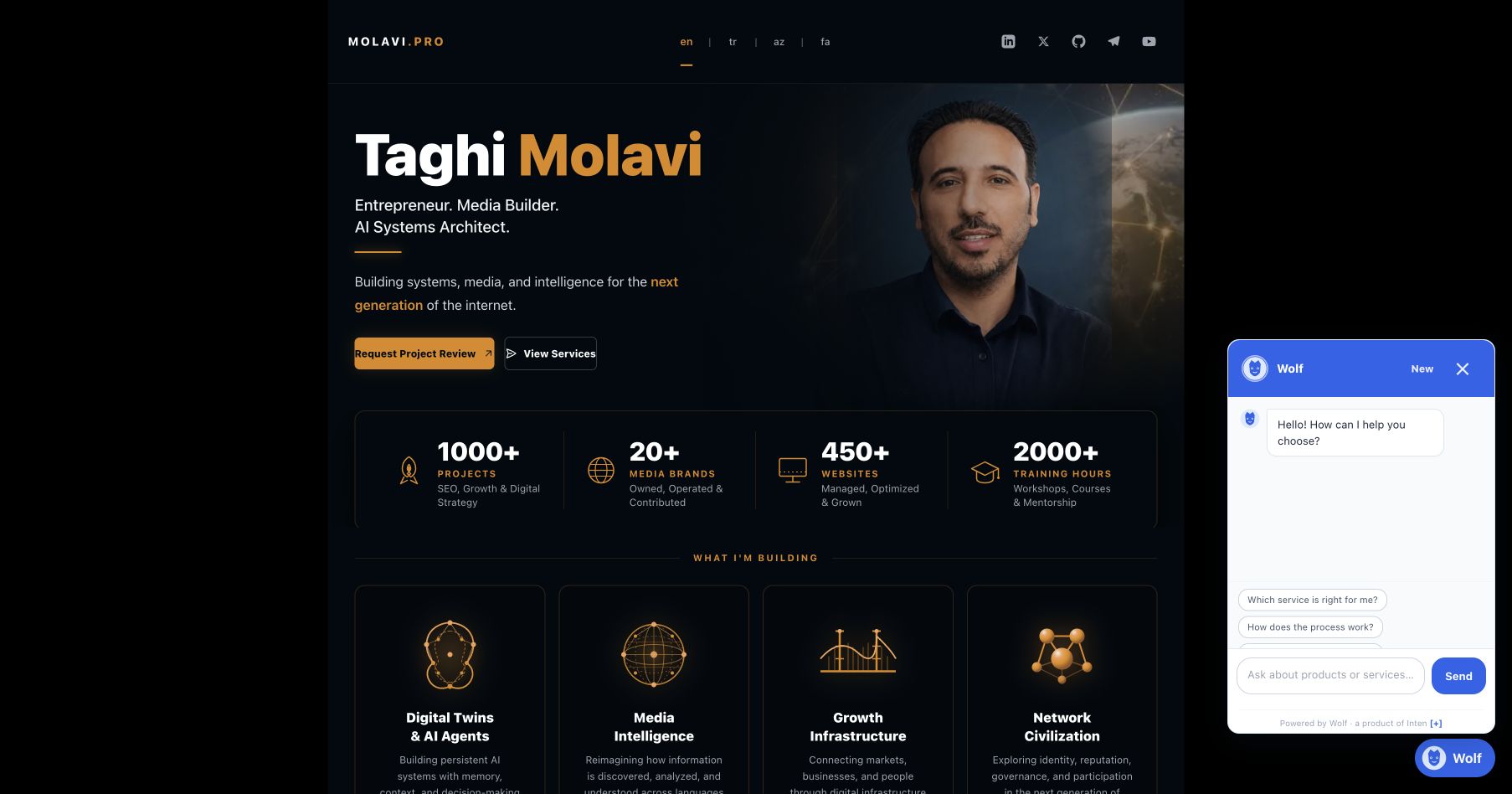
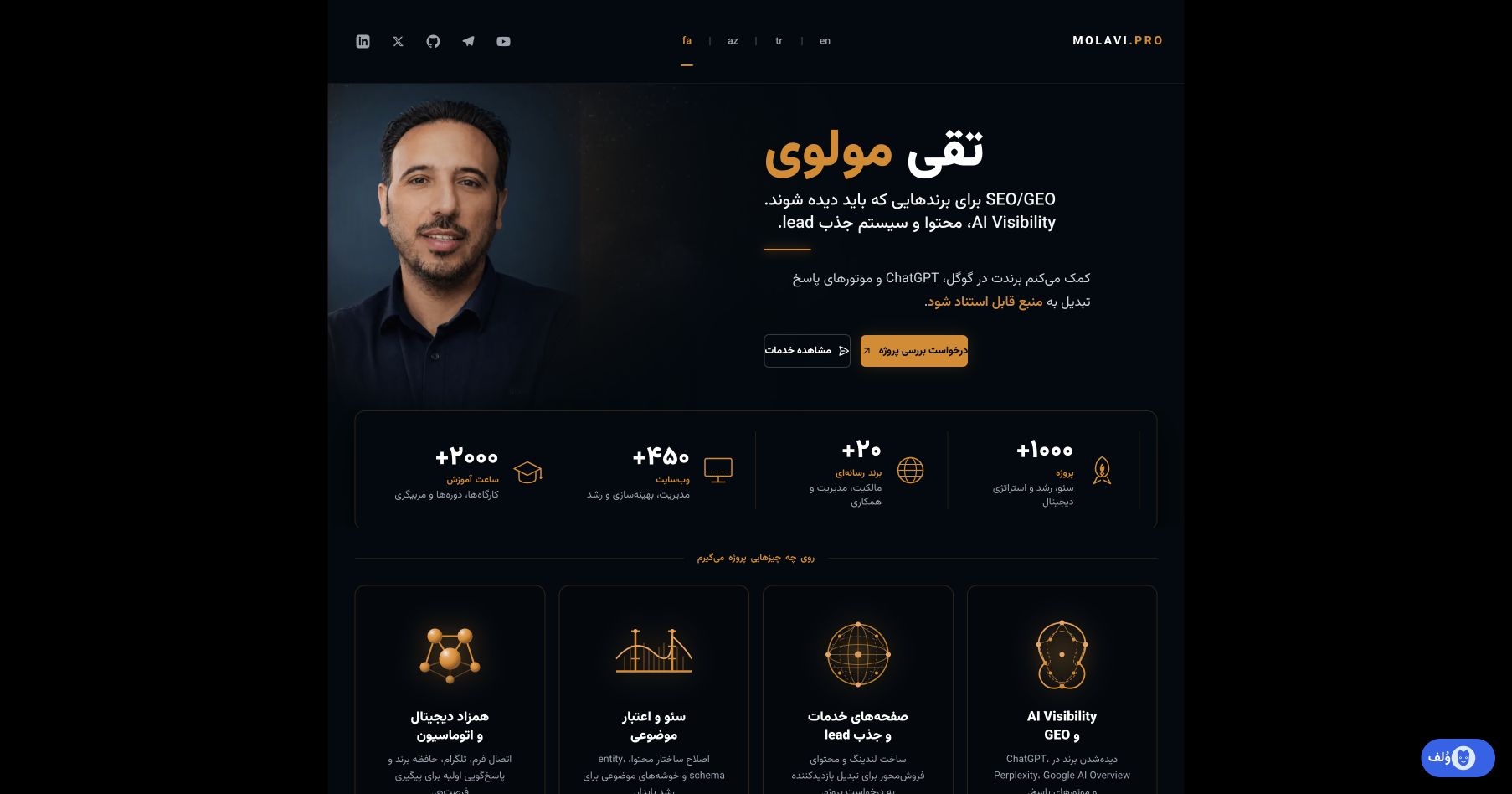
This is the primary reference: Wolf was installed on the real multilingual Molavi.pro Next.js site using its shared App Router layout and the production widget. The disposable Node.js fixture below is regression-only.
Guides: docs/guides/molavipro-nextjs-fa.md · docs/guides/molavipro-nextjs-en.md
import Script from 'next/script';
const wolfProjectId = process.env.NEXT_PUBLIC_WOLF_PROJECT_ID;
<Script src="https://wolf.inten.asia/api/widget.js" data-project={wolfProjectId} data-lang="auto" strategy="afterInteractive" />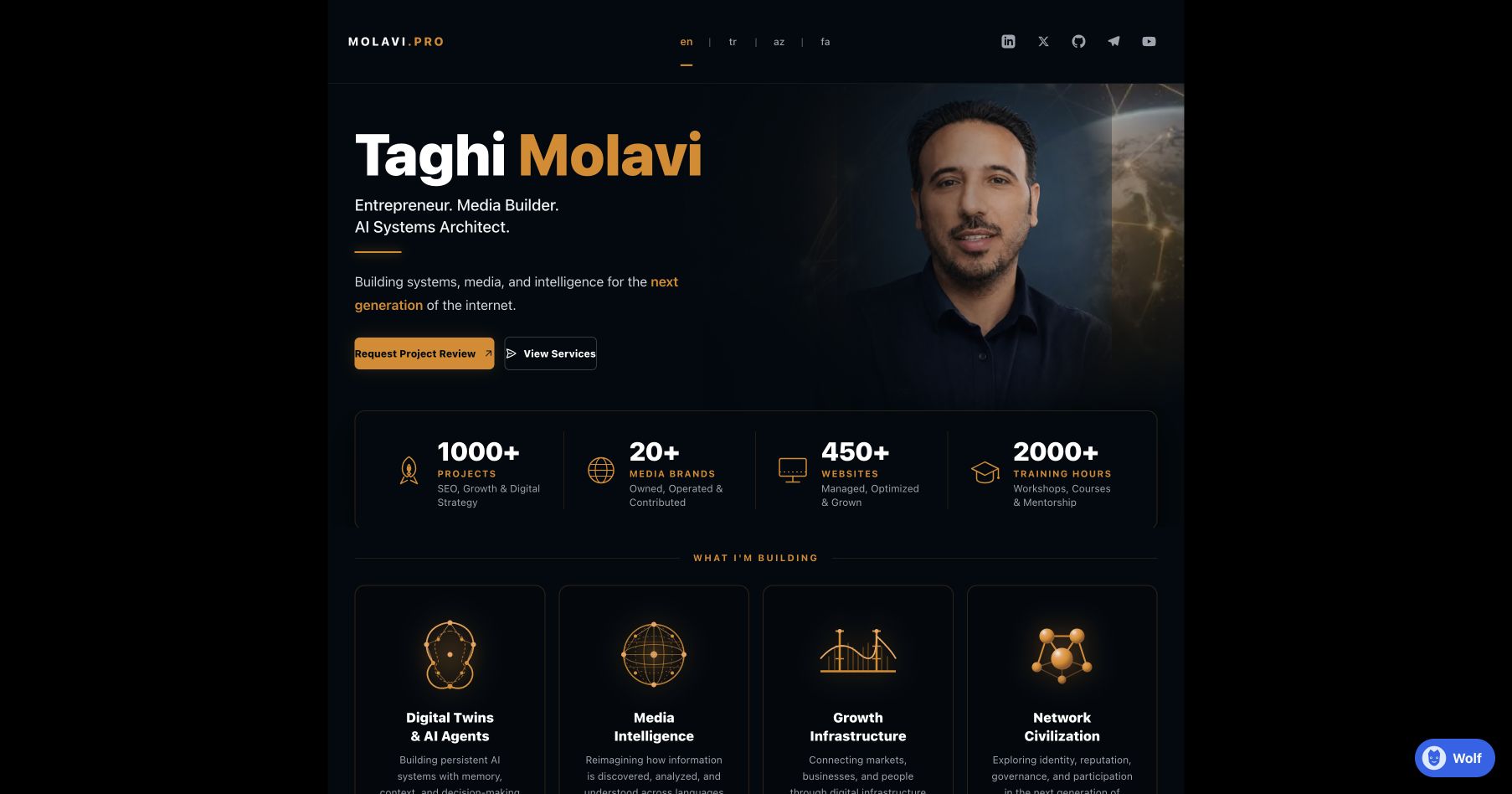
Node.js generalization
For Express/EJS or plain HTML, place the universal script in the shared template. Next.js-specific code is only the layout insertion point.
Regression fixture
The disposable Node.js fixture is a test fixture, not a customer implementation example.
Full source guide: docs/guides/nodejs.md. Fixture source: docs/fixtures/nodejs-demo.
پیادهسازی واقعی Molavi.pro
نمونه اصلی همین سایت واقعی Next.js است. fixture نود فقط برای regression نگه داشته شده و نمونه مشتری محسوب نمیشود.
Plain HTML, Express and Next.js
For plain HTML or an Express/EJS layout, paste the widget script before the closing body tag. In Next.js, load it from a client-side layout/component; the widget runs in the browser, so this guide makes no fictional SSR claim.
<script src="https://wolf.inten.asia/api/widget.js" data-project="YOUR_PROJECT_ID" data-lang="auto"></script>See docs/guides/plain-html.md and docs/guides/rest-api.md for the normal and advanced paths.
سایت اختصاصی
برای HTML، Express و قالبهای اختصاصی همین کد را قبل از بستهشدن body قرار دهید. در Next.js آن را در بخش client اجرا کنید؛ ابزارک برای مرورگر است.
Real case studies and reusable lessons
- Molavi.pro: service/content reference. Start with service pages, FAQ and contact information; review large archives before approval.
- Inten: service discovery, conversation context and lead flow were browser-tested on the real site.
- WooCommerce: optional disposable runtime covers product sync, price, stock and grounded answers; it is not required for service businesses.
- Node.js: Northstar Studio fixture proves the universal widget path.
Observation log and privacy rules: docs/case-studies/observation-log.md and docs/DOCUMENTATION_SCREENSHOT_PROCESS.md.
مطالعات موردی واقعی
برای Molavi.pro از الگوی سایت خدماتی و محتوایی استفاده شد؛ برای Inten، کشف خدمات، مکالمه و ثبت لید واقعی بررسی شد؛ ووکامرس اختیاری است؛ و مسیر Node.js با fixture جداگانه اجرا شد.
Start here — for business owners
Wolf is a sales employee for product businesses, service businesses, agencies, clinics, consultants, B2B teams and local businesses. WooCommerce is optional; Wolf also works with WordPress and custom websites.
- Create your account and name your business.
- Choose products, services, or both.
- Connect WordPress with the official plugin, or send the custom-site guide to your website manager.
- Let Wolf read your pages, then review and correct what it found.
- Choose the outcome you want: a call, a quote, a purchase, or a consultation.
- Set the name, avatar, welcome message, and tone.
- Test real customer questions before activating the widget.
از اینجا شروع کنید
اگر صاحب فروشگاه، شرکت خدماتی، آژانس، کلینیک یا مشاور هستید، لازم نیست اطلاعات فنی بدانید. در پنل ولف کسبوکارتان را معرفی کنید، سایت را وصل کنید، اطلاعاتی را که پیدا شده بررسی کنید و بعد چند سوال واقعی مشتری را امتحان کنید.
Sales & leads
A lead is a potential customer who shows serious interest and leaves a phone number or email. Wolf should ask for contact details only when the conversation shows a useful reason for follow-up — not in every chat.
- Service example: a visitor asks about SEO, explains their website problem, and requests a consultation.
- Product example: a visitor asks about price or stock and wants help choosing an item.
- The owner can find the lead beside its conversation, source page, time, language and requested service.
فروش و لید
لید یعنی مشتری بالقوهای که برای خرید، مشاوره یا تماس جدی است و اطلاعات تماس خود را گذاشته است. ولف فقط زمانی راه تماس میخواهد که ادامه پیگیری برای مشتری معنا داشته باشد. لید در کنار مکالمه، صفحه مبدا، زمان، زبان و نیاز مشتری دیده میشود.
The Project Brain
All information used by Wolf is stored as Verified Memories in the Project Brain. Unlike conventional chatbots, Wolf does not learn from chats directly; instead, unanswered questions or visitor suggestions are stored as Learning Candidates for manual owner review.
مغز اطلاعاتی پروژه
تمامی اطلاعات ولف به عنوان حافظه تایید شده (Verified Memories) ذخیره میشوند. برخلاف چتباتهای قدیمی، ولف پاسخهای خود را تخیل نمیکند و فقط از فکتهای تایید شده توسط شما یاد میگیرد. سوالاتی که در حافظه موجود نیستند به عنوان نامزدهای یادگیری در پنل شما قرار میگیرند تا به صورت دستی آنها را رد یا تایید کنید.
Widget Script Embed
Insert this script snippet at the bottom of your HTML body to load the chat widget on any custom website:
<script src="https://wolf.inten.asia/api/widget.js" data-project="YOUR_PROJECT_ID" data-lang="auto"></script>قرار دادن کد ابزارک چت
برای نمایش چت در وبسایتهای سفارشی، کد کوتاه زیر را قبل از بسته شدن تگ body در کدهای قالب خود قرار دهید:
WordPress Plugin
Our secure plugin is lightweight and handles widget injection automatically. Download the latest version of the plugin directly from the workspace connection tab, upload it under Plugins -> Add New, and enter your isolated Project ID to activate.
افزونه وردپرس
افزونه رسمی وردپرس سبک و امن است. نسخه فشرده ZIP را از پنل دانلود کنید، در بخش افزونهها -> افزودن وردپرس بارگذاری و نصب کنید و شناسه اتصال پروژه خود را وارد نمایید.
WooCommerce Catalog Sync
When WooCommerce integration is enabled for your project, Wolf reads product lists directly from your catalog. It syncs product names, attributes, prices, and stock statuses to recommend correct catalog items to buyers.
همگامسازی کاتالوگ ووکامرس
پس از فعالسازی، ولف محصولات فروشگاه را شامل نام کالا، ویژگیها، قیمت و موجودی انبار میخواند تا محصولات مناسب را به بازدیدکنندهها پیشنهاد دهد و لینک خرید ارسال کند.
Common problems
Wolf is not visible on my site
Open WordPress Setup, check that the widget is active, use the connection test, and then choose reconnect if needed.
Wolf gives a wrong answer
Open Knowledge, find the information, edit or disable it, save, and ask the same question again in Test Wolf.
Wolf does not know a new page
Run a new website sync. Review the newly found information before relying on it in customer conversations.
My payment did not complete
Check the order status in Billing. A failed or canceled payment must not add credits. Contact billing support if the status remains unclear.
رفع مشکلات رایج
برای دیده نشدن ابزارک، از بخش وردپرس وضعیت ابزارک را بررسی و تست اتصال یا اتصال مجدد را اجرا کنید. برای جواب اشتباه، اطلاعات را در بخش دانش اصلاح و دوباره تست کنید. برای اطلاعات جدید، همگامسازی دوباره را اجرا کنید. اگر پرداخت ناموفق بود، وضعیت سفارش را در بخش مالی بررسی کنید.
Developer Chat API
For custom frontends, query the chat endpoint directly using a server-side API Key. Never expose API keys in browser JavaScript. Set your Key prefix as `Bearer` header.
curl -X POST https://wolf.inten.asia/api/public/chat \
  -H 'Content-Type: application/json' \
  -H 'Authorization: Bearer YOUR_API_KEY' \
  -d '{
    "project_id": "YOUR_PROJECT_ID",
    "visitor_id": "visitor_user_12",
    "message": "Do you offer international shipping?"
}'وبسرویس اختصاصی API
برنامهنویسان میتوانند با استفاده از کلیدهای امنیتی پروژه، چت ولف را در اپلیکیشنهای موبایل یا پرتالهای دلخواه ادغام کنند. از افشا کردن کلیدها در کدهای فرانتاند خودداری کنید.
REST Ingestion Connector
To ingest dynamic catalogs or documents from external APIs into the Wolf knowledge base, format your JSON endpoint to return a list of facts:
[
  {
    "title": "Refund Policy",
    "content": "All returns must be shipped back within 14 days of purchase."
  },
  {
    "title": "Support Contact",
    "content": "Our hotline is open 24/7 at support@inten.asia"
  }
]
Enter this REST URL in the connection settings, and Wolf will sync it automatically every hour.
همگامسازی از طریق وبسرویس REST
شما میتوانید فکتها و اطلاعات داینامیک کسبوکار خود را در قالب آرایه JSON بالا طراحی و آدرس وبسرویس خود را در تنظیمات منابع وارد کنید تا کارمند فروش به صورت خودکار هر ساعت آن را همگام کند.
Outgoing Webhooks
Wolf triggers outgoing webhooks to notify external systems when crucial events occur. For example, when a new buyer lead is generated:
{
  "event": "lead.generated",
  "project_id": "prj_example123",
  "data": {
    "name": "Arash Rad",
    "email": "arash@example.com",
    "phone": "09123456789",
    "company": "Rad Corp",
    "need": "Wants WooCommerce sync pricing details"
  },
  "timestamp": 1786390000
}
Configure your webhook payload URL in the project settings panel to receive real-time JSON payloads.
وبهووکهای خروجی
هنگامی که یک مشتری اطلاعات تماس خود را در چت وارد میکند، لید ثبت شده بلافاصله به همراه جزییات مکالمه و علاقه کاربر به صورت فرمت JSON بالا به آدرس وبهووک ثبت شده ارسال میشود.
Security & SSRF Mitigation
Wolf implements robust security practices to protect client sites:
- SSRF Protection: Crawler validates target IP addresses and rejects private network endpoints (like 127.0.0.1, 169.254.169.254, or metadata endpoints).
- Redirect Revalidation: Bounded crawler revalidates redirect targets at every hop to prevent redirect attacks.
- Project Isolation: Project databases and memory structures are strictly segregated by tenant.
امنیت اطلاعات و مقابله با SSRF
ولف از استانداردهای امنیتی بالایی برخوردار است:
- جلوگیری از SSRF: ربات خزنده آدرسهای IP مقصد را اعتبارسنجی کرده و دسترسی به رنجهای شبکه داخلی و خصوصی را مسدود میکند.
- اعتبارسنجی تغییر مسیر (Redirects): تمامی مسیرهای ارجاعی به طور مکرر کنترل میشوند تا از حملات تغییر مسیر جلوگیری شود.
- ایزولهسازی پروژهها: پایگاه داده و بردارهای حافظه هر مشتری به صورت مجزا و ایزوله نگهداری میشود.